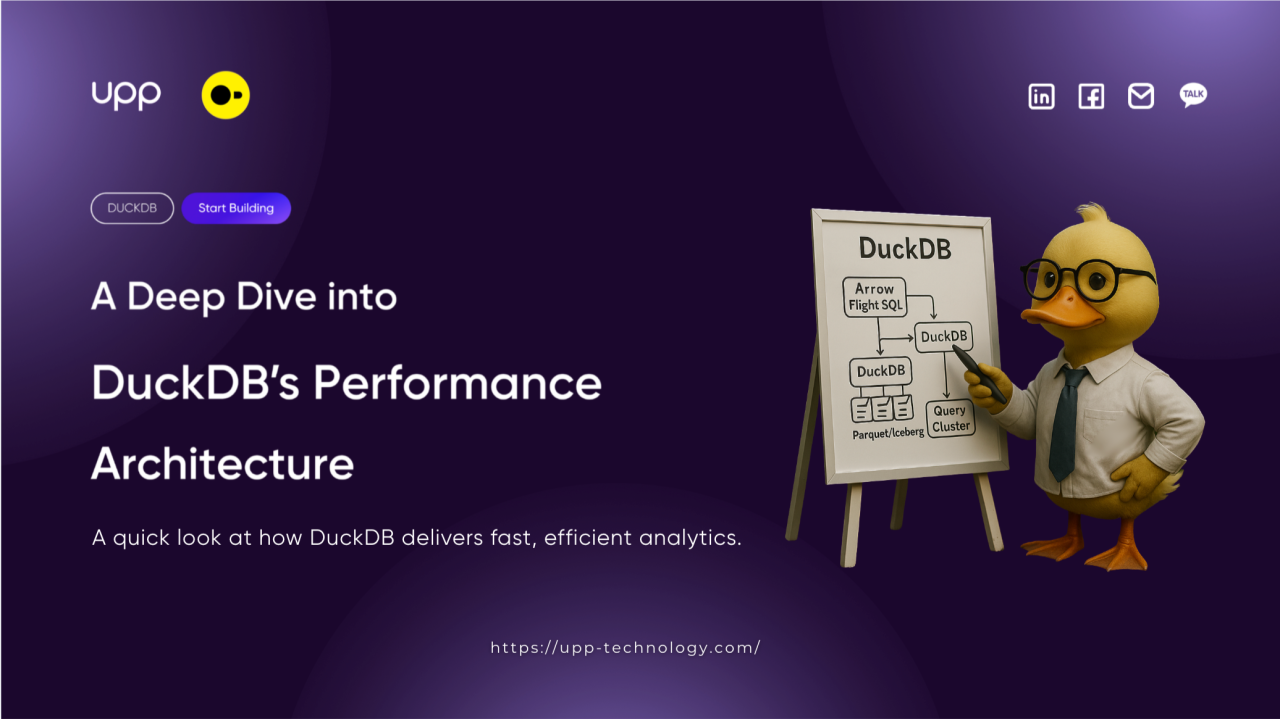
DuckDB Under the Hood: A Deep Dive into its Performance Architecture
Date
August 4th, 2025
Reading Time
10 mins
What's news
Introduction
If you’ve ever thrown a gigabyte-sized Parquet file at DuckDB and gotten a result back in seconds, you’ve probably had that “wait, how?” moment. It feels like magic, but it’s not. That speed comes from a series of smart, deliberate design choices that set it apart from other tools.
In this part, we'll explore what's happening on the inside and explain its speed. Instead of just talking about its functions, we'll focus on the question: ‘How does it do that?’
Our exploration will focus on the three architectural pillars that give DuckDB its strength - the “secret trio” that allows it to significantly outperform other tools in the local data analytics space: Columnar Storage, Vectorized Execution Engine and Morsel-Driven Parallelism.
Join us as we dive deep into decoding these core technologies and understand how they work together to deliver a breakthrough data analysis experience, right on your own computer.
1. The Core Architectural Trio: The Secret to Its Speed
DuckDB is not fast because of just one thing. It is fast because three important parts work together. These three parts are Columnar Storage, the Vectorized Execution Engine, and Morsel Driven Parallelism.
1.1. Columnar Storage
Traditional databases like PostgreSQL or MySQL store data in rows. This is called row-based storage. In this system, all the values of one row are stored together, like [id_1, name_1, age_1], [id_2, name_2, age_2], and so on. This is great for queries where you want all the data from one row, like when you look up a user by ID.
But in analytical tasks, you usually only need a few columns from many rows. For example, if you want to calculate total sales for each product, you don’t need to read all 50 columns of the table. With row-based storage, the system still has to read every column, which wastes time and I/O.
DuckDB uses columnar storage instead. In this model, data is stored by column: [id_1, id_2, ...], [name_1, name_2, ...], [age_1, age_2, ...]. This has two big advantages. First, DuckDB only reads the columns you ask for in your query, which saves time and memory. Second, data in the same column is often similar, so it can be compressed more easily.
Real-world Example: Imagine you have a Parquet file sales_records.parquet with 50 columns, but you only want to calculate the total sales by product category.
SQL-- This query only read data from two columns: ‘product_category’ and ‘sales_amount’ -- The other 48 columns are not read from disk SELECT product_category, SUM(sales_amount) FROM 'sales_records.parquet' GROUP BY product_category;
This is the first reason why DuckDB can process wide files (with many columns) with such incredible speed. Additionally, DuckDB takes advantage of Parquet’s row-group metadata, such as min/max values per column, to skip reading entire data blocks when filtering, a technique known as predicate pushdown.
1.2. Vectorized Execution Engine
Storing data in columns is just the beginning. The next step is processing that data quickly. Many traditional systems process data row by row. This is called tuple-at-a-time execution. For each row, the CPU runs several function calls, which takes time.
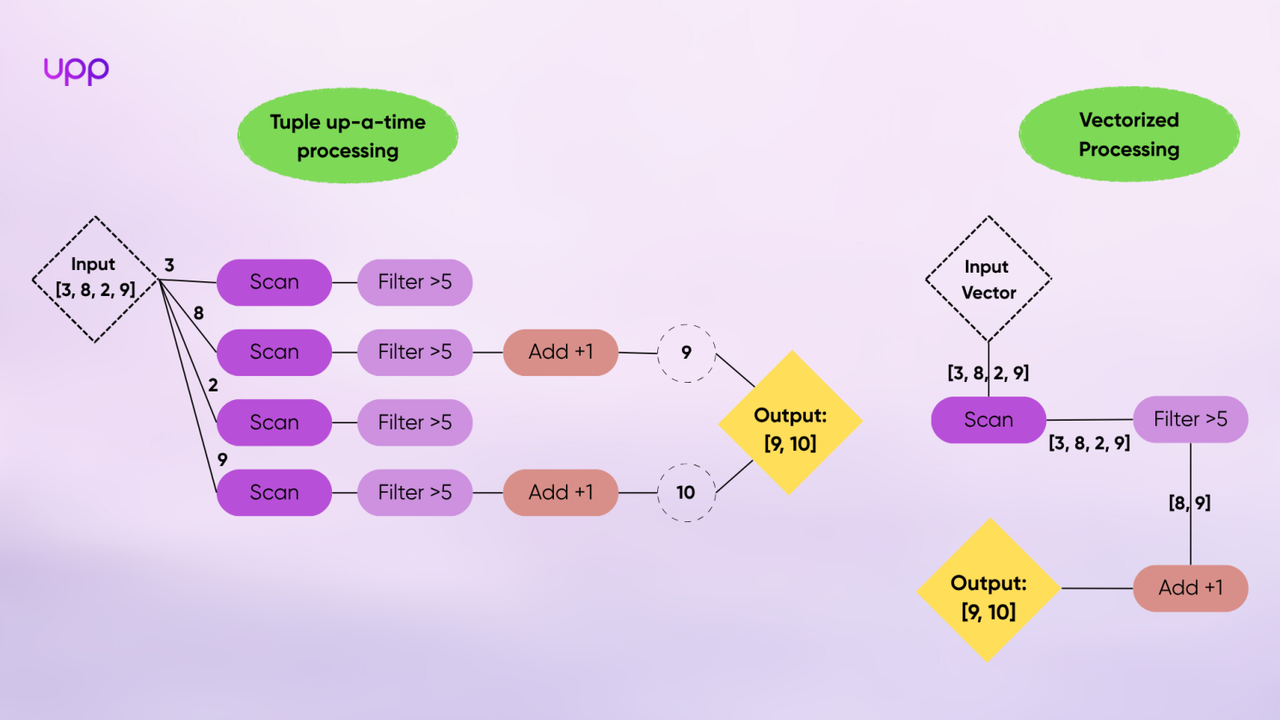
DuckDB uses a different method called vectorized execution. Instead of processing one value at a time, it processes a whole batch (usually 1024 or 2048 values) in one function call. This is much faster.
You can think of it like this: the old way is like building one chair at a time from start to finish. The vectorized way is like an assembly line where you cut all the wood first, then assemble, then paint. This batch processing reduces overhead and makes better use of the CPU’s cache.
1.3. Morsel-Driven Parallelism
Modern CPUs are multi-core, but not every tool can fully exploit this potential. DuckDB's solution is a unique parallelization model called Morsel-Driven Parallelism.
-
First, DuckDB breaks down the data in the columns into small “morsels”.
-
Next, it builds an execution plan composed of operators like scan, filter, and aggregate.
-
Finally, DuckDB distributes these morsels to all available CPU cores. Each core runs a copy of the execution plan on the morsel of data it receives.
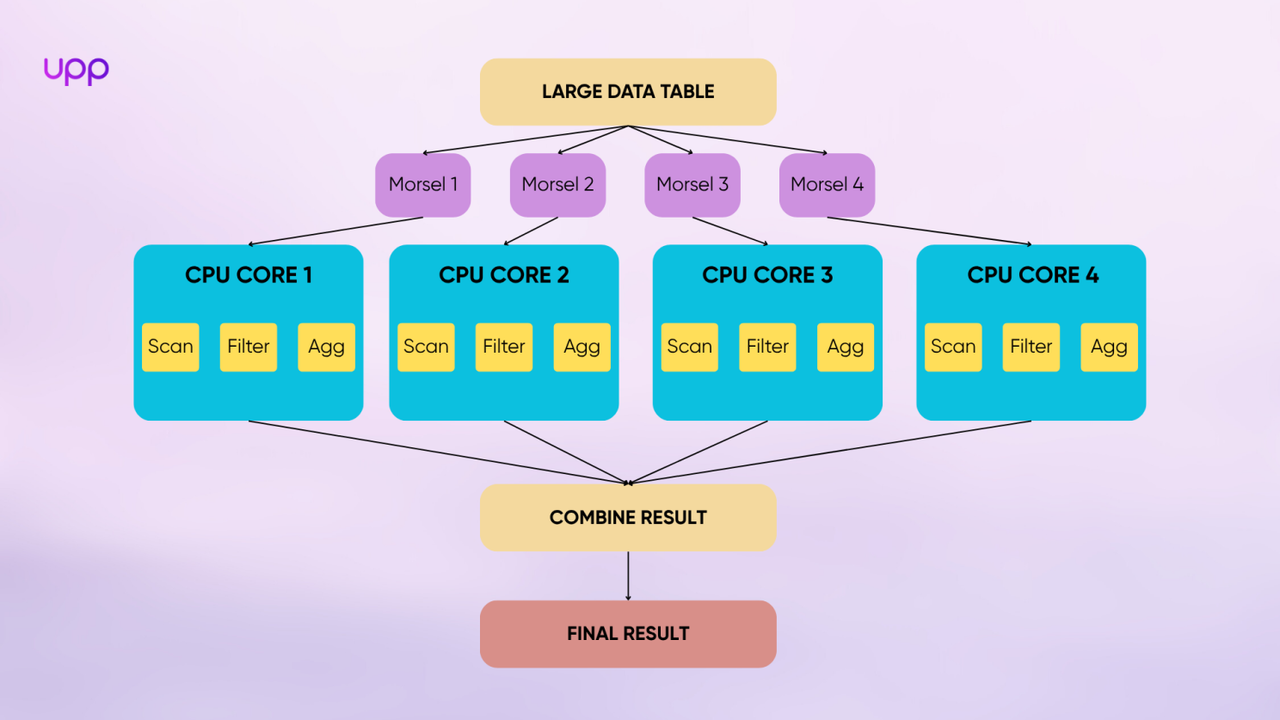
This model allows DuckDB to automatically scale the workload across all available computing resources without requiring any user configuration. If your machine has 8 cores, DuckDB will try to run the job on all 8. If it has 32 cores, it will use all 32. As a result, query speed increases almost linearly with the number of CPU cores, letting you fully tap into modern hardware for faster results.
The combination of these three factors which reading only what’s necessary (Columnar), processing it efficiently (Vectorized), and doing as much as possible at once (Parallel) is the formula that creates DuckDB's outstanding performance.
2. Beyond the Core: Other Features That Improve Performance
While the core trio powers DuckDB’s query engine, there are deeper layers that complete the performance puzzle.
2.1. The In-Process Architecture
DuckDB is an in-process database. This means it runs inside your application, such as Python, Jupyter, R, or C++. Unlike other systems like PostgreSQL or Snowflake, there is no server or external connection. Everything happens in your program.
This design brings many advantages. First, there is no network delay because your application and the database are in the same process. Second, it starts instantly, just one line of code like import duckdb. Third, it integrates smoothly with tools like Pandas, NumPy, and Apache Arrow, without needing to copy or convert data.
This makes DuckDB perfect for local analysis, notebook use, or apps that need an embedded database engine.
2.2. Intelligent Memory Management: The Buffer Manager
Beyond its three main pillars, DuckDB also features an efficient Buffer Manager, a quiet but vital component that handles memory. Buffer Manager is an intermediate layer that sits between main memory (RAM) and the data stored on disk. When DuckDB queries data from a Parquet file or its own tables, the Buffer Manager ensures that:
-
Frequently used data is kept in RAM (caching).
-
Older and less-used data blocks are replaced using an LRU (Least Recently Used) strategy to make room for new data.
-
The system avoids re-reading from disk if the necessary data is already available in this buffer cache.
This has a huge impact in practice:
-
Repetitive queries on the same dataset become much faster after the first run.
-
DuckDB doesn’t require you to manually perform memory tuning like larger systems do. It automatically adjusts to deliver the best possible performance with the resources you have.
3. When Not to Use DuckDB?
No matter how powerful a tool is, it has its limits and is not a solution for every problem. To be an informed user, it's crucial to know when not to use DuckDB. DuckDB is an OLAP (Online Analytical Processing) database. Its entire architecture is optimized for reading and analyzing large datasets. Therefore, it is not the right choice for the following use cases:
3.1. High-Transaction OLTP Systems
This is the most clear-cut use case to avoid. Applications that need to handle thousands of small write, update, or delete transactions per second (e.g., the backend of an e-commerce site, a booking system, or user management) require an OLTP database.
3.1.1. Explain Why It is not a Best Choice
DuckDB uses columnar storage and processes data in batches. This is great for reading large amounts of data but not good for writing small pieces of data very often. If your system needs to insert, update, or delete small records all the time, DuckDB is not designed for that kind of work.
3.1.2. What should you use instead?
You should choose a traditional row-based database system. These include PostgreSQL, MySQL, or SQL Server. They are better for handling many small and frequent write operations.
3.2. Centralized, High-Concurrency Data Warehouses
DuckDB is designed as an in-process database, performing powerfully for a single user or a single application. It is not intended to replace server-based data warehouses that serve an entire organization.
3.2.1. Why isn’t it a good fit?
DuckDB is not made to handle many users or services working at the same time. Its concurrency model is simple. It supports one writer and several readers, but not hundreds of users reading and writing at once. This makes it less suitable for large, shared environments.
3.2.2. What should you use instead?
If your company needs a shared system where many people and services access the same data, you should use a cloud data warehouse. Good choices are Google BigQuery, Snowflake, Amazon Redshift, or a self-hosted system like ClickHouse. These tools are made to support many users at the same time and can be your company’s “single source of truth.”
Conclusion
DuckDB has filled a critical gap in the data ecosystem. It brings the power of a high-performance analytical database directly into your workspace—without servers, without setup, and without complexity. From its columnar and vectorized core to smart memory handling and an embedded design, every part of DuckDB is optimized for speed and simplicity.
Now, you not only know what DuckDB can do, but why it does it so well. With the techniques and insights from this article, you're ready to harness DuckDB to solve real data problems, faster and more elegantly than ever before.
Newsletter
DISCOVER MORE



















































































![[Recap] UPP Global Technology JSC Establishing Anniversary](/homepage/news-section/new-4.webp)















































LET’S TALK...
Content delivered to your inbox


ENTER YOUR EMAIL
YOU WANT TO...


Hanoi, Vietnam
Web3 Tower, No. 15, Alley 4, Duy Tan, Cau Giay, Hanoi, Vietnam